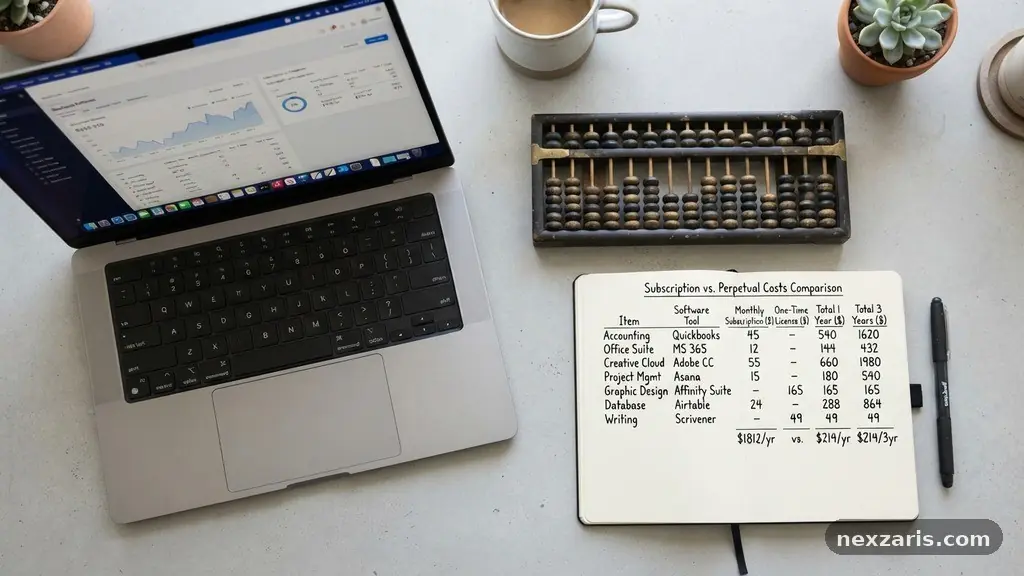
How to Compare Free and Paid Software Without Overspending
Learning the art of comparing Free and Paid Software Without Overspending is a vital skill for anyone managing a digital budget. Whether you are an individual freelancer or a small business owner, the goal is to find tools that solve your problems without draining your bank account through unnecessary subscriptions.
By evaluating your actual needs against the value provided by various pricing models, you can make smarter procurement choices. This article helps you understand the hidden trade-offs and long-term financial implications of the tools you choose, ensuring you remain productive while keeping your overhead costs at a sustainable level.
Understanding the True Cost of Software
When you look at software pricing, the sticker price is rarely the final amount you pay. Total cost of ownership involves more than just the monthly subscription fee or a one-time purchase price.
You must account for the time spent learning the interface, migrating your data, and potentially paying for third-party integrations. If a free tool requires ten hours of manual work every week to replicate a feature that a paid tool automates, your labor costs have already exceeded the subscription fee.
Software procurement is often clouded by the allure of zero-dollar price tags. However, open-source alternatives often require specialized technical knowledge to host and maintain. If you are using cloud infrastructure to run your own instances of an open-source tool, you are paying for server time, storage, and security patches.
These expenses can quietly add up, making a supposedly free tool more expensive than a managed proprietary software solution. Always calculate the “all-in” cost before committing to a platform.
Evaluating Feature Parity and Real Needs
Many users fall into the trap of paying for enterprise licensing when they only need basic functionality. Feature parity is the concept of comparing two products to see if they offer the same capabilities.
Often, a paid version includes dozens of advanced features that you will never actually use in your day-to-day workflow. If you only need a text editor to draft documents, paying for a heavy-duty suite with complex collaboration tools is a waste of resources.
Before upgrading to a paid tier, list your absolute “must-have” requirements versus your “nice-to-have” features. If a free version covers 80% of your daily operations, it is often better to find a creative workaround for the remaining 20% rather than committing to a recurring monthly bill.
This approach keeps your overhead lean and prevents you from paying for software bloat. Remember that simplicity is often a feature in itself, reducing the cognitive load required to get your work done.
The Hidden Costs of Freemium Models
The freemium model is designed to get you hooked on a workflow before placing essential features behind a paywall. While these versions are excellent for testing, they can lead to significant friction once your usage grows.
You might find that your data is trapped in a proprietary format, making it difficult to switch to a cheaper alternative later. This is a classic example of vendor lock-in, where the cost of migrating away from a platform becomes higher than the cost of staying.
| Cost Factor | Free Software | Paid Software |
|---|---|---|
| Initial Investment | $0 | Variable Subscription |
| Maintenance Time | High (Self-managed) | Low (Managed) |
| Data Portability | Often Restricted | Usually Supported |
| Support Access | Community Forums | Dedicated Helpdesk |
When assessing these tools, consider how easily you can export your data. If you cannot move your files to a different application, you are effectively paying a “hostage” fee to the software provider. Always verify that a service supports standard file formats before committing your most important projects to their ecosystem.
Identifying and Avoiding Subscription Fatigue
Subscription fatigue occurs when you have so many recurring monthly charges that you lose track of their combined impact on your budget. Many people pay for multiple tools that perform overlapping functions without realizing it.
You might be paying for a project management suite while your email provider offers a perfectly capable task tracker for free. Regularly auditing your digital subscriptions is an essential step in maintaining financial health.
To combat this, perform a quarterly audit of your software bills. Cancel any service that you have not logged into within the last 30 days.
If you find yourself using a tool only once or twice a year, consider switching to a pay-per-use model or a simpler free alternative. By streamlining your tech stack, you reduce your attack surface for security breaches and simplify your accounting processes.
Managing Technical Debt and Scalability
Technical debt is what happens when you choose a cheap, quick-fix solution that becomes a burden later. If you start your business on a free, unscalable tool, you will eventually have to pay the “interest” on that decision when your data volume exceeds the free tier’s limits.
This often results in a frantic, expensive migration during a busy period. It is often wiser to choose a scalable paid tool from the start if you anticipate significant growth.
Scalability is not just about user counts; it is about how the software handles complexity. A tool that works well for one person might fail under the weight of a team of ten.
If you need to collaborate, share permissions, or integrate with other APIs, you might find that paid tiers offer essential security and administrative controls that are simply not available in free versions. You can find more information on evaluating digital tools through the National Institute of Standards and Technology guidelines on software security.
Strategic Procurement for Small Teams
When you are part of a small team, software procurement requires a consensus on what truly matters for productivity. Often, individuals will request specific tools because they are familiar with them, not because they are the most cost-effective solution.
Standardizing your team on a few core platforms can significantly reduce costs through volume discounts. It also lowers the collective learning curve, as everyone is using the same set of tools.
- Standardize your core software suite across all team members.
- Utilize educational or non-profit discounts if you qualify.
- Negotiate annual billing cycles to capture deep discounts versus monthly rates.
- Check for “legacy” pricing that might be cheaper than current market rates.
- Use browser-based tools to avoid device-specific licensing fees.
Avoid the temptation to buy “all-in-one” platforms unless you are certain you will use the majority of the modules. Many companies pay for expensive suites when they only need a single component. Sometimes, purchasing three separate, focused, and inexpensive tools is cheaper and more effective than buying one massive, bloated enterprise platform.
When to Invest in Paid Solutions
There is a point where paying for software becomes a clear investment in your own efficiency. If a $20-a-month tool saves you three hours of work, you are effectively paying less than $7 per hour to reclaim your time.
For many professionals, this return on investment is a no-brainer. Paid software generally offers better reliability, regular updates, and professional support, which are valuable assets during critical business moments.
Prioritize paying for software that protects your data or facilitates direct revenue generation. If a tool handles your invoicing, payment processing, or customer database, the cost of a premium, supported version is an insurance policy against data loss and downtime.
Save your budget for the tools that provide the highest leverage. You can continue to use free, lightweight alternatives for non-critical tasks like note-taking or simple file storage.
Frequently Asked Questions
How can I tell if a free tool is actually secure?
Check the company’s privacy policy and look for independent security audits. If the tool is open-source, you can review the code or see if a large community maintains it. Avoid tools that require excessive permissions on your device or browser.
Is it better to pay annually or monthly?
Annual billing usually offers a discount of 15% to 30%, which is great if you are certain you will use the software for the full year. However, if you are testing a new tool, start with a monthly subscription to ensure it meets your needs before committing to the longer term.
What should I do if a free tool suddenly starts charging?
This is a common occurrence in the software industry known as “enshittification.” Always have a backup of your data in a neutral format like CSV or Markdown. If the new pricing structure doesn’t align with the value you receive, have a list of pre-researched alternatives ready to switch to immediately.
Are “lifetime deals” actually worth the cost?
Lifetime deals can be a great way to save money if the company is established and the product is stable. However, they are a gamble with new startups that might go out of business in a year. Only buy a lifetime license if you would be happy with the product even if the company stopped updating it tomorrow.
How do I negotiate for better software pricing?
If you are a small business, don’t be afraid to reach out to sales teams. Mention that you are comparing them against a competitor and ask if they have any small-team discounts or promotional pricing available. Many vendors have flexible structures that aren’t advertised on their public pricing pages.
Final Thoughts on Smart Software Choices
Finding the right balance between free and paid tools is an ongoing process of refinement. By focusing on your actual workflow requirements rather than marketing promises, you can avoid the common pitfalls of software bloat. Remember that the best tool is the one that gets the job done with the least amount of friction and the lowest long-term expense.
When you master the strategy of comparing Free and Paid Software Without Overspending, you gain control over your digital environment. Stay diligent about auditing your subscriptions, prioritize your core needs, and do not be afraid to switch tools when your requirements evolve. Your budget and your productivity will thank you for the extra effort you put into these decisions today.